Open and free alpha
The RPG screen
for every table
In person or remotely, don't turn your tabletop RPGs into a video game. Keep the immersion without breaking the flow, with tools that are easy to use. Notes, sheets, maps, soundscapes: all in one place.
ExploreThe best of both worlds: the speed of digital, the soul of old-school preparation. Everything you need to bring your players into the heart of the adventure.
That is Eldortale
A screen made for the GM
Your workspace, your notes, everything only you should see.
A screen made for players
Share what you want in an instant, run combats smoothly, and use (or skip) digital character sheets.
Easy to use
No server to set up, no licence to buy: launch, prepare, play.
Four pillars: prepare once, reuse everywhere
Prepare with a clear head, play without wasting time digging through your notes.
Your game systems, worlds and campaigns
Your game system, your worlds and your tabletop RPG campaigns, all in one place. You write a location once in your world, and you find it again in each of your campaigns.
- Create your game system: stats, conditions, house rules
- A world for your locations, factions and characters, used by as many campaigns as you like
- Templates (reusable sheet models) to create an NPC or a location without starting from scratch
- Adapt an NPC to a single campaign without changing the original
Soundscapes
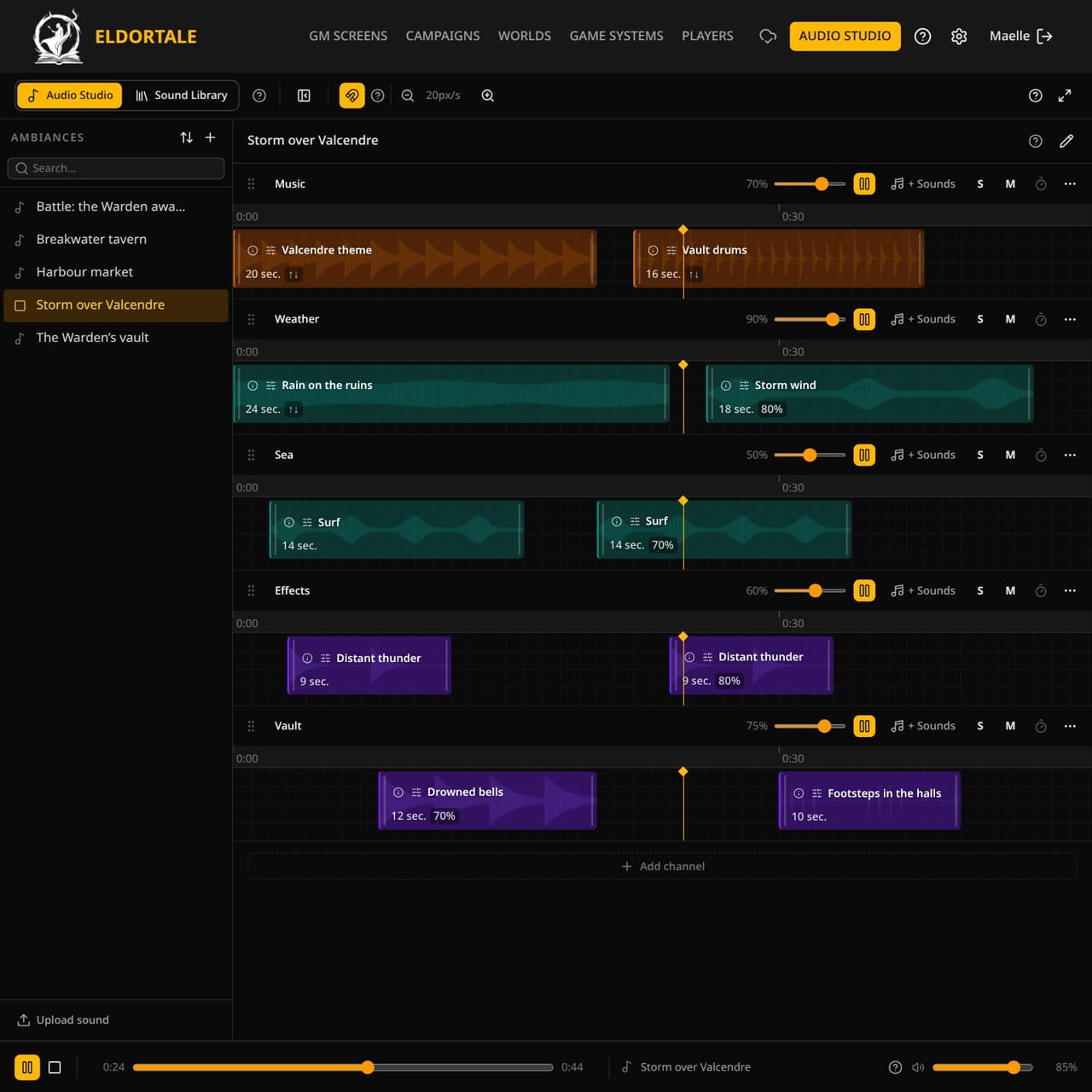
An audio studio for your tabletop RPG sessions: you build your soundscapes from your own sounds, set the volume of each sound ahead of time, then start each soundscape with one click during the game.
- Your own sound library, usable in all your campaigns
- A soundscape is several layered sounds, with loops and volumes set one by one
- A mixer to adjust volumes mid-game
- Sounds from your files or from a YouTube link (played in a visible player)
- Fade in and fade out on the sounds from your files (not on YouTube)
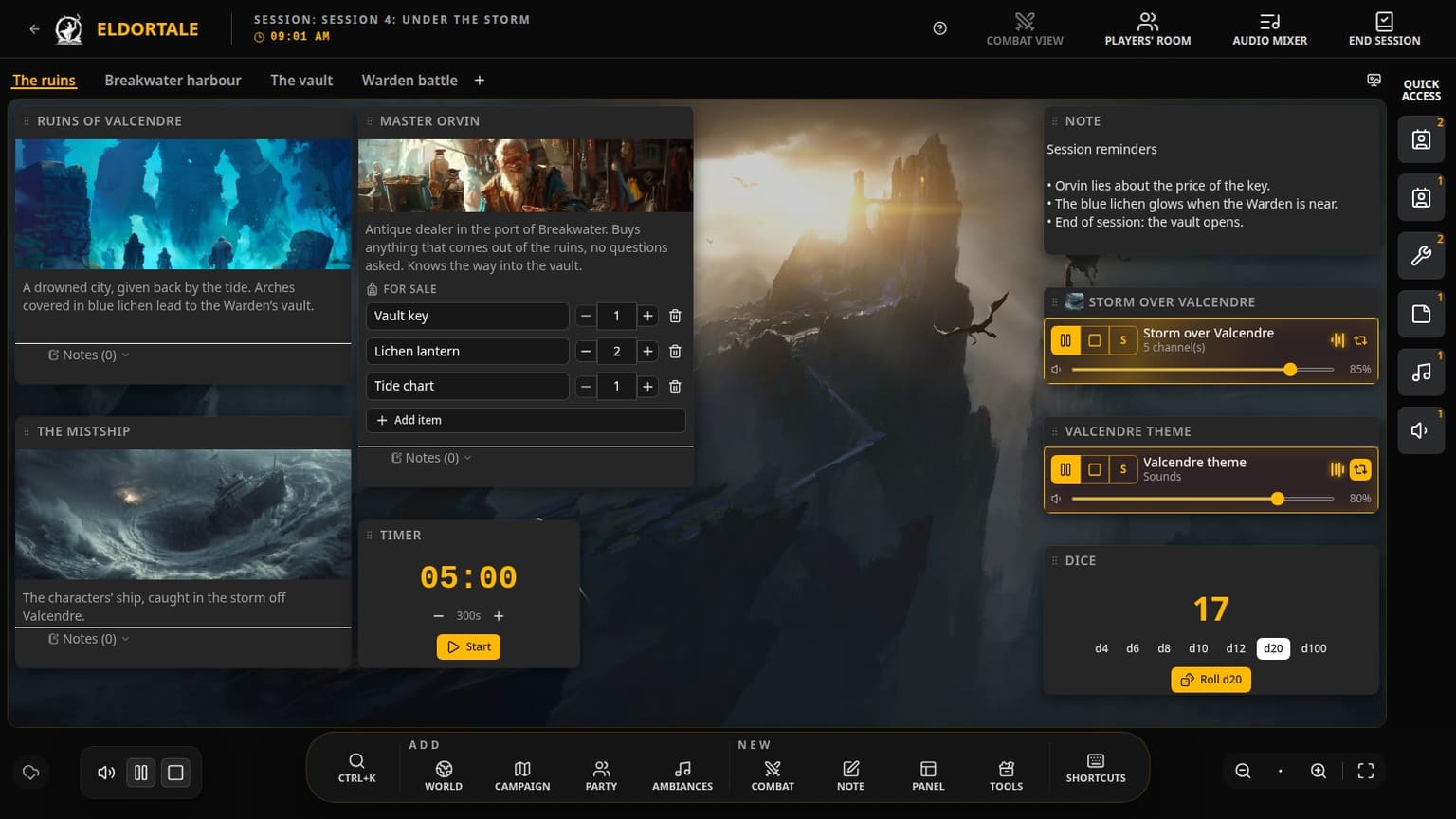
The GM screen
A GM screen holds several spaces, for example one per scene. In each space, you place the windows you need: a note, an NPC sheet, the combat tracker, the soundscapes. You open the scene's space and everything is already in place.
- Floating windows you can resize and stack, or pin to keep them visible from one space to another
- Several spaces, for example one per scene, each with its own background
- Global search (Ctrl+K) to open any sheet
- Keyboard shortcuts you set yourself, and a quick access bar
- A GM screen created in one click from a scene you have prepared
The players' room
The players' room is a screen shared live with your players: they open a link on their phone, tablet or computer. You choose what is shown, when, and what stays hidden. It runs through our servers and is part of the cloud subscription.
- Your players join with a link and a nickname, without creating an account
- Fog of war revealed zone by zone, live
- The GM draws live, everyone can point at a spot
- Combat tracker, and a character sheet for each player
- Your players can look back at the images you shared
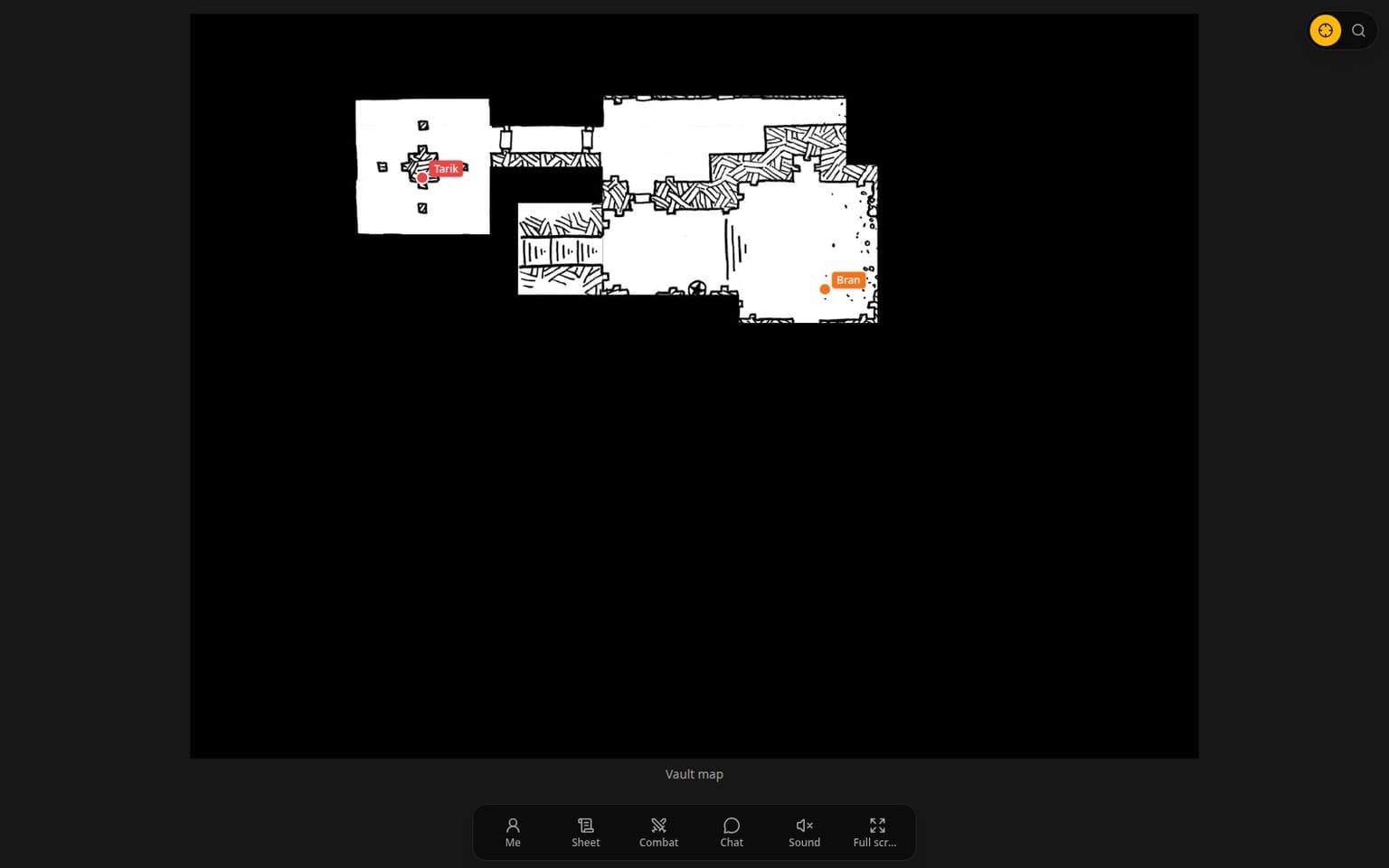
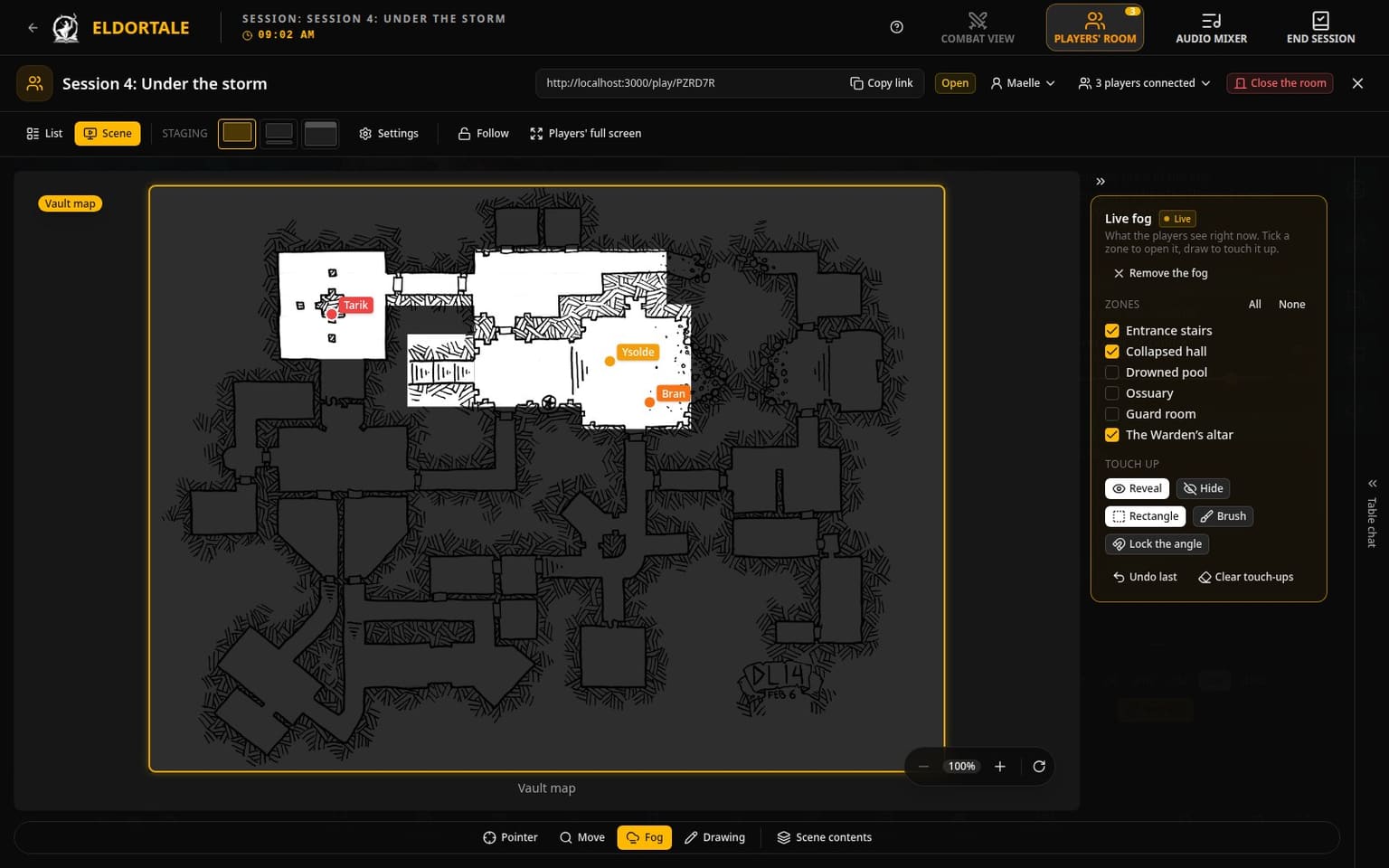
Drag to compare
Players' room
Cloud subscriptionThe second screen
at your table
Set a tablet in the middle of the table, or send a link to your players: they see the current illustration, the map and the zones you reveal. No account to create, and it works just as well when someone plays remotely. This players' room runs through our servers: it is part of the cloud subscription.
Try it now
Soundscapes
When the sound lands
on your narration
The crackle of the fire in the inn's fireplace. Thunder as the storm approaches. Wind in the leaves of an ancient forest. Waves against the hulls in the greatest storm of the century.
You bring your sounds (files or YouTube links), build your soundscapes ahead of time and reuse them from one tabletop RPG session to the next.
And in detail
What hides behind the four pillars: the tools you will use without thinking about it, game after game.
Worlds and sheets
Character, location, object or creature sheets: you choose your sheet types. Your sheets live in a world and serve all of that world's campaigns. You write a city once, you find it again in each one.
Rich text editor
Headings, callouts, collapsible sections, table of contents, checklists. Mention another sheet right in the text: during the game, you open that sheet with one click.
Sheet templates
A template is a model for a character or location sheet. You build it once for your NPCs, locations or monsters, with the elements you need: combat, inventory, text fields. When you edit the template, every sheet created from it offers to update itself.
Editable game systems
Describe your stats, your conditions, your combat actions and your house rules. No system ships with the app: you create the one for your game.
Campaigns, acts and scenes
An assistant helps you start your campaign: you give it a name, you can pick a world and a game system, then create a first act and a first scene. After that, you write scene by scene. Each scene gathers its sheets and planned fights, and one click turns it into a GM screen.
Combat tracking
Plan your fights in a scene or start one mid-game: initiative, hit points, conditions, each creature's actions. Your players see whose turn it is, and the state of the opponents in words (unharmed, badly hurt, at death's door).
Annotated maps
Place markers, zones and arrows on your images and maps, and link them to a sheet. Scroll to zoom, drag to move.
Session history
At the end of the game, you write the session summary and review what changed: sheets, scenes, fights. Next time, you know where you left off.
Image library
All your illustrations and maps in one place, available in any image field. Import them once, use them everywhere. Sounds have their own library, in the audio studio.
Player tables and sheets
The characters at your table, with their stats and conditions, at hand during the game. You assign a character sheet to a player: they see it on their own screen, without the parts you keep secret.
Guided first steps
A guided tour of the main screens, a 5-step path to prepare your first game, and help bubbles where the tool is dense. You don't have to understand everything on the first evening.
In your browser
Nothing to install to try it. A desktop app is in the works. You choose the interface language: French or English.
The app is free
Everything you do on your GM screen is free and unlimited. The subscription covers what goes through our servers: the players' room, sync and storage for your media.
- Local
Free
- The full GM screen
- Worlds, campaigns, sheets
- Soundscapes
- Works offline
- Not included: the players' room
- Cloud · Storyteller
€4* /month · 1 GB
- Multi-device sync
- Online players' room
- Session backups
- Version history
- Cloud · Archivist
€9* /month · 10 GB
- Everything in Storyteller
- High quality media
- Sharing between GMs
- Priority support
* These plans are planned for the beta. Their content, terms and prices may change: they are only temporary indications. Some features of these plans will arrive later. During the alpha, everything is free.
Frequently asked questions
- Which game systems?
- Yours. You describe your stats, conditions, house rules and sheet templates. Combat tracking relies on a health stat and an initiative stat that you define.
- Do I need a connection?
- To log in, yes. After that, you can open the app and edit your content without a network: everything syncs when the connection returns. Sharing with your players and uploading images and sounds need a network.
- Do my players need an account?
- No. They join with the link you send them and pick a nickname. Only you need an account.
- Browser or desktop?
- For now, the browser: nothing to install. A desktop app is in the works.
- What does « alpha » mean here?
- The alpha is the version available today, and it will stay that way for a few more weeks. You can already run a real game with the app, but screens still change and a few features are missing. The beta will be the next step. Your feedback on the Discord shapes what comes next.